
Over 80 percent of American professionals report that poor task visibility slows team progress and leads to missed deadlines. Managing complex workflows can quickly overwhelm even the most organized teams, especially when communication breaks down. By exploring visual task planning methods, you will discover proven ways to make priorities clear and boost collaboration—whether you are coordinating a startup, a marketing team, or a large technology project.
Table of Contents
- Defining Visual Task Planning Methods
- Key Features And Visual Tools Compared
- Using The Eisenhower Matrix For Prioritization
- Real-World Scenarios And Success Stories
- Avoiding Mistakes With Visual Task Planning
Key Takeaways
| Point | Details |
|---|---|
| Visual Task Planning Enhances Communication | Creating visual representations of tasks improves team communication and project coordination. |
| Hierarchical Task Representation is Vital | Methods like ConcurTaskTrees break down workflows into manageable components, allowing for better understanding of task relationships. |
| Eisenhower Matrix for Task Prioritization | Categorizing tasks by urgency and importance maximizes productivity and helps in efficient scheduling. |
| Avoid Common Mistakes | Ensure visuals are clear and concise; avoid overcomplicated layouts and maintain consistent updates for effectiveness. |
Defining Visual Task Planning Methods
Visual task planning transforms abstract workflow management into a concrete, actionable strategy. By creating visual representations of tasks, teams can dramatically improve communication, prioritization, and project coordination. At its core, visual task planning turns complex projects into clear, comprehensible maps that anyone can understand.
One prominent approach in visual task planning involves the hierarchical task representation used in ConcurTaskTrees, which allows teams to break down complex workflows into interconnected components. This method provides a graphical syntax that reveals task relationships, dependencies, and potential bottlenecks before they become problematic. Teams using visual planning techniques can quickly identify critical paths, allocate resources more effectively, and maintain a holistic view of project progress.
Development teams particularly benefit from visual planning methods that emphasize communication and coordination. As research from Chalmers University demonstrates, visual planning helps development teams enhance collaboration by transforming abstract tasks into visible, trackable elements. This approach goes beyond traditional task lists by creating spatial representations that highlight interconnections, priorities, and potential workflow challenges.
Visual task planning isn’t just about creating pretty diagrams – it’s a strategic approach to understanding work complexity. By mapping tasks visually, professionals can reduce cognitive load, improve team alignment, and create more transparent project management processes.
Pro Tip for Visual Task Planning: Experiment with different visual mapping techniques like mind maps, Kanban boards, or Gantt charts to find the representation that best suits your team’s unique workflow and communication style.
Key Features and Visual Tools Compared
Visual task planning tools have revolutionized how professionals manage complex workflows, offering an array of features designed to transform abstract concepts into actionable strategies. These tools range from simple mind-mapping software to sophisticated project management platforms that provide comprehensive visual representations of tasks and team progress.

One critical aspect of visual task planning involves creating clear, digestible visual representations. Graphical abstracts demonstrate how single images can dramatically improve information comprehension, a principle that extends directly to task management tools. Modern visual planning platforms leverage this insight by creating intuitive interfaces that allow users to quickly understand project structures, dependencies, and potential bottlenecks at a glance.
Understanding the importance of visual communication is key to selecting the right tool. Visual representations enhance understanding, increase engagement, and make complex information more accessible, which translates directly into more effective project management. Different tools offer unique approaches to visual task planning, including:
- Kanban boards with drag-and-drop task management
- Gantt charts for timeline and dependency tracking
- Mind mapping tools for brainstorming and conceptual planning
- Interactive dashboards with real-time progress visualization
Professionals should evaluate visual task planning tools based on their specific workflow needs, team size, and project complexity. Some tools excel at individual task tracking, while others shine in collaborative team environments.
Here’s a comparison of popular visual task planning tools and their ideal use cases:
| Tool Type | Best For | Unique Strength |
|---|---|---|
| Kanban Board | Ongoing team collaboration | Visual workflow flex |
| Gantt Chart | Timeline and dependency view | Detailed scheduling |
| Mind Map | Brainstorming new projects | Idea association |
| Dashboard | Real-time progress tracking | Data at a glance |
Pro Tip for Selecting Visual Tools: Test multiple visual task planning tools using free trials, focusing on how intuitively they represent your specific workflow and how easily team members can adapt to the interface.
Using the Eisenhower Matrix for Prioritization
The Eisenhower Matrix transforms task management from chaotic guesswork into a strategic approach for maximum productivity. By categorizing tasks across four critical quadrants based on urgency and importance, professionals can systematically prioritize their workload and eliminate time-wasting activities.
Time and motion studies demonstrate how careful task analysis can dramatically improve work efficiency, a principle central to the Eisenhower Matrix methodology. The matrix breaks tasks into four distinct categories:
- Urgent and Important Tasks (Do Immediately)
- Critical deadlines
- Crisis management
- Pressing problems requiring immediate attention
- Important but Not Urgent Tasks (Schedule)
- Strategic planning
- Professional development
- Long-term goal advancement
- Urgent but Not Important Tasks (Delegate)
- Interruptions
- Some meetings
- Certain administrative work
- Neither Urgent nor Important Tasks (Eliminate)
- Time-wasting activities
- Excessive social media
- Unproductive distractions
Visual routines help professionals parse complex information and extract critical spatial relationships, which mirrors how the Eisenhower Matrix helps individuals visually organize their workflow. By creating a clear, quadrant-based visualization, professionals can instantly understand which tasks demand immediate attention and which can be strategically postponed or eliminated.
Successful implementation requires consistent practice and honest self-assessment. Professionals must critically evaluate each task’s true importance, avoiding the trap of mistaking busyness for productivity.
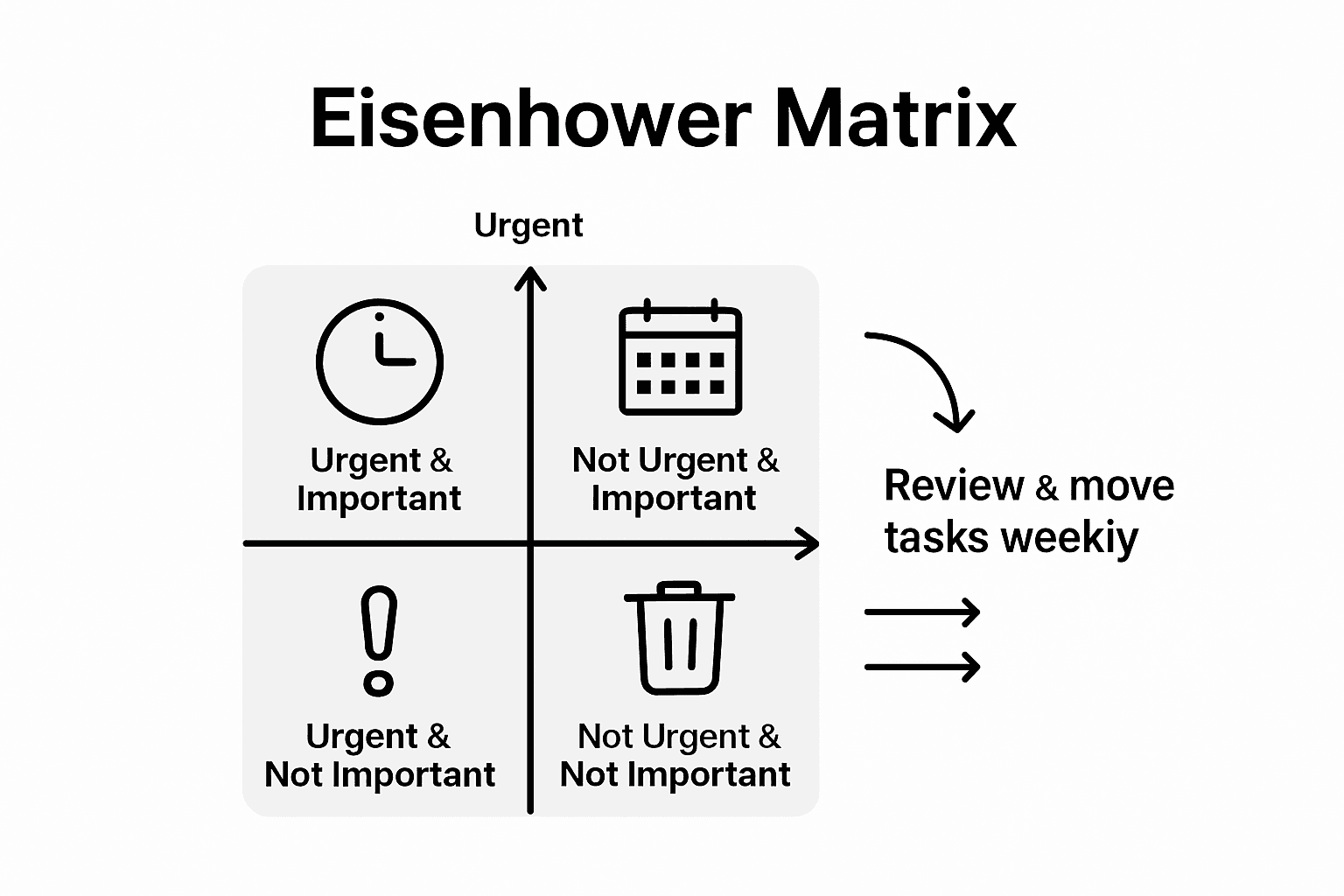
Pro Tip for Matrix Mastery: Conduct a weekly review of your task quadrants, ruthlessly eliminating activities that consistently fall into the “neither urgent nor important” category to maintain peak productivity.
Real-World Scenarios and Success Stories
Visual task planning transforms theoretical productivity concepts into tangible organizational strategies across diverse professional environments. From healthcare to technology startups, professionals are discovering how systematic visual approaches can revolutionize workflow management and team collaboration.
Visual management tools have proven remarkably effective in improving program planning and team coordination within complex healthcare settings, demonstrating the power of strategic visual task organization. For instance, pediatric healthcare teams have used visual mapping techniques to streamline communication, reduce administrative overhead, and enhance overall project efficiency.
Visual thinking strategies have shown significant potential in developing critical professional skills, particularly in high-stakes environments that require precise observation and strategic decision-making. Medical students, for example, have improved their diagnostic capabilities by leveraging visual task management approaches that encourage systematic information processing and comprehensive problem evaluation.
Successful implementation of visual task planning varies across industries but consistently reveals several key benefits:
This table summarizes key benefits that organizations gain from visual task planning:
| Benefit | How It Helps Teams | Example Impact |
|---|---|---|
| Improved Alignment | Ensures shared project understanding | Fewer miscommunications |
| Faster Adaptation | Enables quick response to change | Rapid task reprioritization |
| Resource Efficiency | Optimizes staff and time allocation | Project cost reduction |
| Lower Cognitive Load | Makes complex info easier to process | Less decision fatigue |
- Improved team communication
- Enhanced project transparency
- Faster problem identification
- More efficient resource allocation
- Reduced cognitive load for team members
Real-world examples span multiple sectors, including technology companies streamlining software development, marketing teams coordinating complex campaigns, and remote workforces maintaining productive collaboration across geographic boundaries.
Pro Tip for Success Stories: Document your team’s visual task planning journey, tracking specific metrics before and after implementation to demonstrate concrete productivity improvements and motivate continued adoption.
Avoiding Mistakes With Visual Task Planning
Visual task planning can dramatically improve productivity, but numerous pitfalls can derail even the most well-intentioned efforts. Understanding and anticipating common mistakes is crucial for successful implementation across professional environments.
Common mistakes in visual representations often stem from overcomplicating graphics and misrepresenting critical information, a challenge that extends directly to task management strategies. Professionals frequently make errors that undermine their visual planning effectiveness:
- Overcomplicated Layouts
- Cramming too much information into a single view
- Using complex color schemes that confuse rather than clarify
- Creating visuals that require extensive interpretation
- Lack of Actionable Details
- Missing specific task ownership
- Unclear priority indicators
- Insufficient context for task completion
- Inconsistent Update Practices
- Failing to maintain real-time task status
- Neglecting to remove completed or irrelevant tasks
- Inconsistent tracking across team members
Effective visual representations should remain clear, concise, and accurately represent project dynamics, principles that are equally applicable to task management visualization. Successful visual task planning requires a delicate balance between comprehensive information and intuitive design.
The most successful teams approach visual task planning as a dynamic, evolving process. They regularly review and refine their visual management strategies, ensuring that the tools remain flexible and responsive to changing project needs.
Pro Tip for Visual Clarity: Conduct monthly visual task planning audits, critically examining whether your current system communicates information quickly and accurately without requiring extensive mental processing.
Boost Your Productivity with Visual Task Planning and the Eisenhower Matrix
Struggling to organize your tasks and avoid decision fatigue? This article highlights the power of visual task planning methods and the Eisenhower Matrix to help professionals untangle complex workflows, prioritize effectively, and improve team communication. If you want to move beyond chaotic to-do lists and minimize wasted time on low-value activities, embracing a clear visual framework is essential.

Discover how TaskQuadrant.io leverages these exact concepts by combining intuitive visual mind maps with Eisenhower Matrix task categorization. Whether you are managing urgent projects or scheduling long-term goals, TaskQuadrant.io helps you track progress using visual dashboards and Gantt charts to keep your team aligned and efficient. Start your journey toward smarter task prioritization and experience reduced cognitive load today. Visit TaskQuadrant.io now and transform how you manage work.
Frequently Asked Questions
What is visual task planning?
Visual task planning is a method that transforms abstract workflows into concrete visual representations, helping teams enhance communication, prioritize tasks, and improve project coordination.
How can the Eisenhower Matrix improve my productivity?
The Eisenhower Matrix categorizes tasks into four quadrants based on urgency and importance, helping individuals prioritize their workload and eliminate time-wasting activities effectively.
What are some tools used in visual task planning?
Common tools for visual task planning include Kanban boards for ongoing collaboration, Gantt charts for timeline tracking, mind mapping tools for brainstorming, and interactive dashboards for real-time progress visualization.
What are the benefits of using visual task planning methods?
Using visual task planning methods can lead to improved team communication, faster adaptation to changes, optimized resource allocation, and reduced cognitive load, which collectively enhance overall productivity.
Recommended
- TaskQuadrant Features – Eisenhower Matrix, Projects & Analytics
- TaskQuadrant – Professional Task Management with Eisenhower Matrix
- TaskQuadrant Landing – Eisenhower Matrix Task Management
- Personalplanung Schritt für Schritt für Eventprofis meistern
- Top Workshop Organization Tips for Diesel Injection Technicians 2025 – My WordPress
Leave a Reply